


+ studio updates
New home. keiki weekly is no longer at keikistudio.substack. From this issue on, it lives on product.blog. Same writing, same cadence, same build-in-public stance. We just stopped running two publications when one will do. Subscribers were migrated. Nothing else changes.
Iberia is calling. A handful of investors from the peninsula reached out over the last two weeks to talk. We took the calls. Nothing concrete to share yet, but the questions an early investor conversation forces you to answer are useful in the same way this newsletter is useful. They make you put words to things you would otherwise leave implicit. If anything moves, it will land here first.
+ product updates
Weekly #13 framed Corexi as a continuous UX layer for AI-native products. The thesis: the products of the next decade will be written largely by AI agents, and a one-shot scan tool isn’t enough. UX needs to be a layer the agent lives inside, not a report it reads after the fact.
These two weeks were about making that thesis concrete. We didn’t ship a new tab. We shipped a new location.
Corexi is now an MCP server.
It runs inside Cursor, Claude Code, Windsurf, Replit, and VS Code through the Model Context Protocol, the open standard for how IDE-resident agents talk to external tools. Eight tools the agent can call without leaving the editor: pull a previous scan, read the Corexi ruleset, review a snippet or a screenshot before it ships, trigger a fresh scan from the IDE.
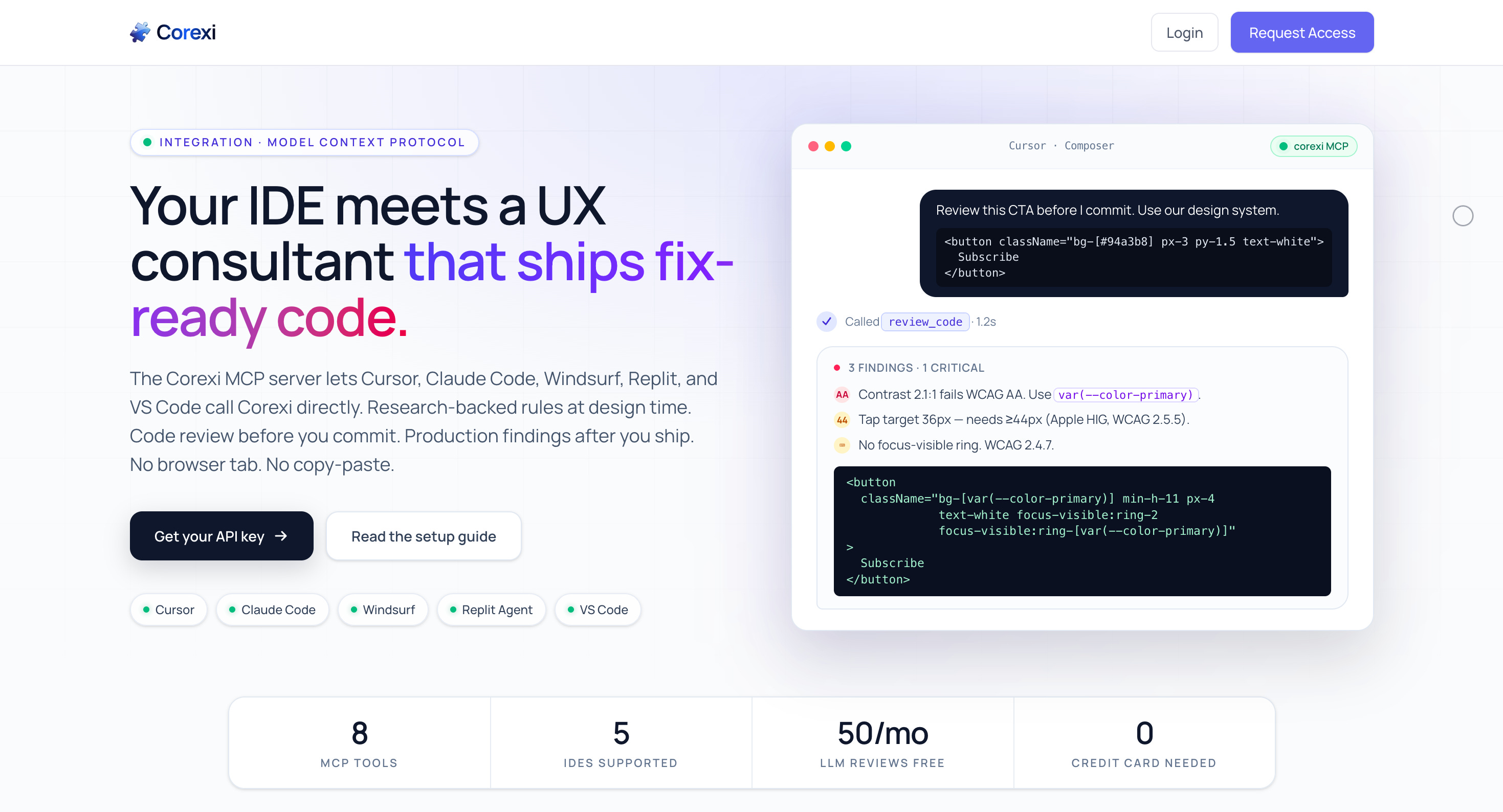
Auth is real. Hashed API keys, rate limits, monthly quotas. Signup drops you at your first key and an IDE config snippet in three screens.
The result is one engine serving two personas. At build time, the agent asks for a review while writing the component and gets back a fix-ready snippet that already uses your design tokens. Post-deploy, it pulls findings from yesterday’s scan and patches them in your repo.
Landing at corexi.com/mcp. Setup at /docs/mcp.
The engine got more trustworthy.
Five things landed inside the engine itself.
Every LLM finding is now cross-checked against axe-core’s deterministic accessibility rules. You can tell at a glance which findings have a hard reference and which are model judgement calls.
Design tokens are now ingested and injected into every prompt, and a second pass walks the generated fix_code afterward, finds any hardcoded hex or px that falls inside a perceptual color and length threshold, and rewrites it in place. Once a team wires their tokens, switching cost rises sharply.
We built an eval set. Curated fixtures with hand-labeled ground truth, a fuzzy matcher, a CI guard that fails the build if recall or precision drops more than five points. We can now say something concrete about how the engine performs instead of relying on vibes.
Multi-state capture. The scanner now triggers focus, modal, and form-validation states on each page, screenshots them, runs axe on the new DOM, and analyzes them as separate captures. Catches a whole class of bugs that static screenshots miss.
A real Lighthouse audit runs on every scan. Performance, accessibility, best practices, SEO, plus Core Web Vitals. Surfaces in the report and through the MCP tools.
Visibility, both sides.
Admin panel for us, dashboard for users, telemetry table underneath. Every MCP tool call is recorded with tool name, status, duration, and detected IDE. Also the foundation for usage-based billing later in the year.
Where this leaves us.
Corexi is no longer a scanner with a dashboard. It’s a verified engine, a continuous review surface inside the IDEs where AI-native code actually gets written, and a per-user telemetry stream that proves it’s being used.
Two personas. One layer. Wherever developers and agents write code.
Next up: an interactive no-login showcase at /mcp/examples, per-state badges in the report UI, and a Cursor marketplace submission so install becomes one click. Pricing is queued behind these.
A Note on Location
There’s a difference between building a tool and choosing where it lives. The first weeks of Corexi were about building the tool. These two were about choosing the location. For AI-native products, location matters more than features. A scanner you have to remember to open is a scanner you forget to open. A scanner the agent calls inside the IDE is a scanner the agent calls all day.
If you’re building an AI-native product and want UX guidance during the build instead of after it, the MCP server is live. corexi.com/mcp.
See you next week.